

Vision




There are 253 million visually impaired people in the world, and most of them rely on the white cane, a simple tool primarily designed to provide ground-level obstacle detection. By equipping the white cane with modern technology, WeWALK improves the safety and independence of the visually impaired, allowing them full and equal participation in everyday life. WeWALK’s ergonomic attachment fits on top of any white cane. Its inbuilt sensors, touchpad, Bluetooth, and voice interface provide turn-by-turn navigation and gain new features by integrating smart city solutions. Moreover, WeWALK builds an ecosystem around the Smart Cane with software services for visually impaired people, parents, and teachers.
WeWALK Smart Cane 2, the most advanced smart cane to date, packed with groundbreaking safety, navigation, and AI features. Driven by lived experiences and the voices of our Community, the Smart Cane 2 was crafted with the goal of creating the ultimate mobility tool for visually impaired people. It is a smart mobility companion designed to provide sensory, and multi-modal feedback to people with visual impairment for a seamless orientation and mobility experience with wayfinding and other cutting edge technologies.
Revolutionary Features of WeWALK Smart Cane 2.
- Enhanced Obstacle Detection: Safety first! Stay safe and aware with WeWALK Smart Cane 2, featuring custom-designed detection technology that alerts you to overhead obstacles through haptic and audible feedback, all while maintaining the ground-level feedback of a standard white cane.
- Intelligent Voice Assistant: Ask any question with a touch of a button and get audio responses straight from your smart cane’s built-in speakers, designed by Harman. For instance, ask your voice assistant for the nearest coffee shop or for travel tips when you’re on vacation.
- Seamless Connectivity: Experience hands-free navigation by keeping your smartphone safely tucked away while connected via Bluetooth. With safety in mind, WeWALK ensures your hands remain free during travel. Effortlessly access WeWALK’s features using your smart cane’s tactile buttons or intelligent voice assistant.
- Accessible Navigation: Access turn-by-turn navigation instructions with multimodal navigation, offering the most efficient routes to your destination. Use clock directions, destination tracking, and low-vision mapping to make any journey a seamless one from start to finish.
- Live Public Transit: Find out about your transit options, navigate to stops, and check timetables, all in one place powered by Moovit. Never miss a bus or train again.
- Boundless Exploration: Experience the world around you with the new smart cane, receiving automatic voice feedback as you pass by nearby points of interest, or easily access a detailed list of nearby shops, restaurants, and everything in between. With Smart Cane 2, your exploration knows no bounds.
- Slim and Sleek: All these breakthrough features are hidden within the thinness and lightness of a standard white cane. Looks like a white cane, but it is actually a smart cane.
- Intuitive Push Button Design: Equipped with a user-friendly push-button design, the smart cane offers effortless operation. Navigate menus seamlessly or assign custom button commands, such as saving your home address or favorite destinations for convenient access. The next destination is a click away.


The Dot Pad X is the world’s first device to seamlessly combine tactile graphics and multi-line braille in one powerful, portable display. Dot Pad X transforms how you learn, work, and explore by making text, images, maps, and even complex math equations fully accessible at your fingertips.
The Dot Pad X is an advanced assistive technology solution that integrates tactile graphics and multi-line braille into a single, highly versatile display. It features a primary 300-cell tactile graphics and multiline Braille display and a secondary single line 20-cell Braille display, allowing for simultaneous perception of images, shapes, and text. Designed for users who are visually impaired and blind, the Dot Pad X facilitates the creation, editing, saving, and sharing of rich, multi-sensory content, significantly enhancing learning, creativity, and reading.
With AI-powered image processing, seamless integration with iOS, iPadOS, and Windows (including JAWS support), and a lightweight design that fits in your backpack, the Dot Pad X opens up endless opportunities for education, creativity, independence, and entertainment. Whether you’re navigating a tactile map, studying STEM subjects, or enjoying comics and art, the Dot Pad X brings the world to life through touch.
Dot Pad X Amazing Features:
- Dual Displays:
– Primary Display: 300-cell tactile graphics and multi-line braille for exploring shapes, images, maps, and detailed content.
– Secondary Display: 20-cell single-line braille panel for comfortable text reading and navigation. - Tactile Graphics Creation – Instantly feel your handwriting, sketches, or signatures as the Dot Pad converts input from a connected device into tactile graphics.
- AI-Powered Image Processing – The Dot Image Processor uses AI to analyse and segment images, ensuring clear, meaningful tactile output optimised for accessibility.
- Intuitive Controls – Six customizable buttons, zoom, pan, invert, and rotate functions put you in full control of your content.
- Connectivity & Compatibility:
– Works seamlessly with iOS/iPadOS 15.2+.
– Now fully integrated with JAWS for Windows, enabling true multi-line braille reading for documents, spreadsheets, and web browsing.
– USB-C and Bluetooth LE for fast connections and portability. - STEM & Math Accessibility – With full MathML support, students and professionals can explore complex equations and STEM materials with accuracy and ease.
- Portability – Compact and lightweight (273 × 228 × 16 mm, 1.2 kg), the Dot Pad X fits easily in your backpack.
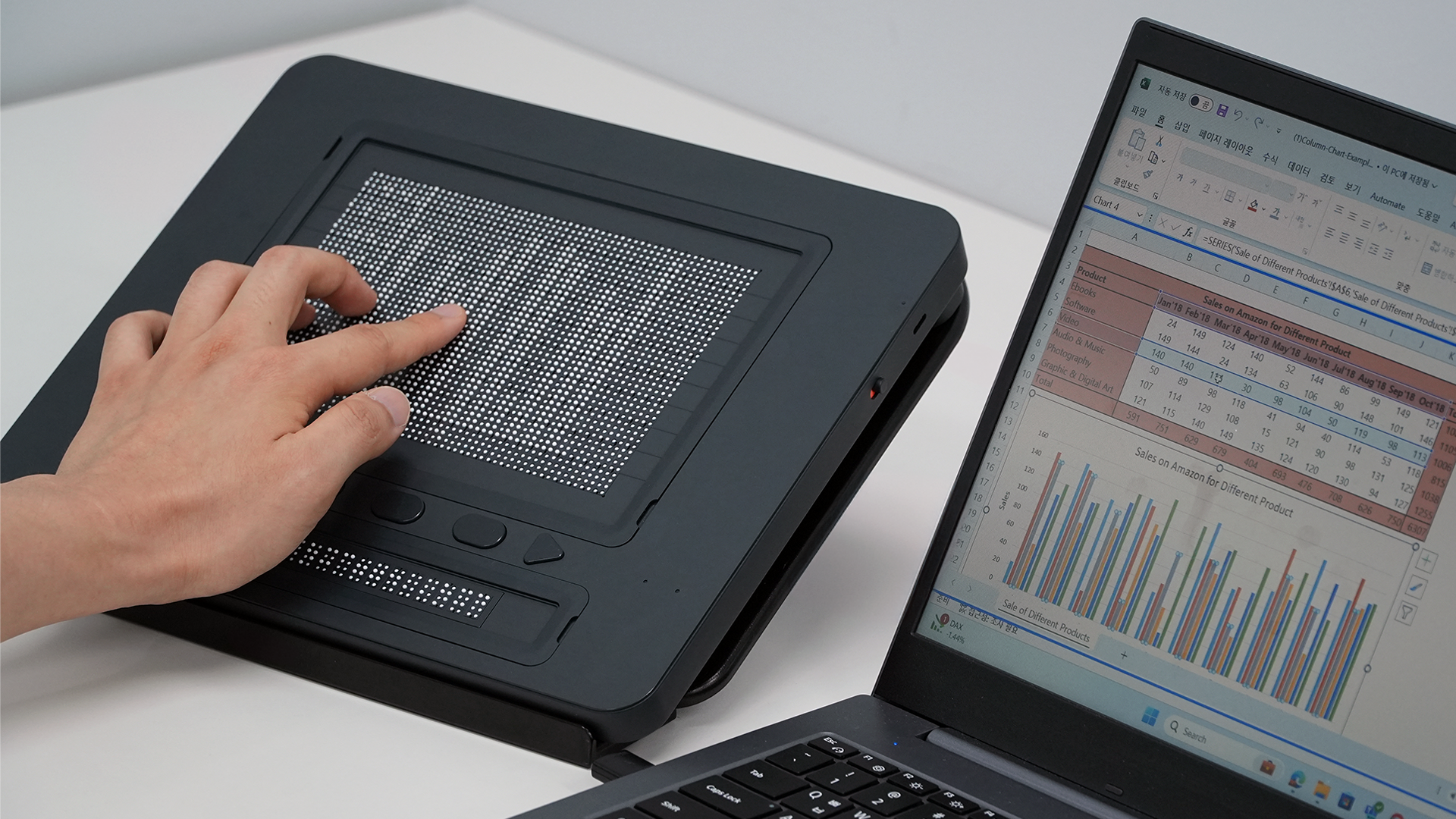


Dot Pad X – The Next Generation of Accessible Technology
The Dot Pad X is a groundbreaking tactile graphics and multi-line braille display with seamless access to text, images, and interactive content.
The Dot Pad X redefines how blind and visually impaired users experience the world of information. By combining a powerful 300-cell tactile graphics and multi-line braille display with a secondary 20-cell braille panel, the Dot Pad X allows users to explore images, shapes, maps, and text simultaneously with an unprecedented level of detail and clarity.
What makes the Dot Pad X truly remarkable is its ability to turn almost any kind of content into a rich, tactile experience. From handwriting, sketches, and signatures to charts, diagrams, and illustrations, users can instantly create and interact with tactile graphics directly from their connected devices. This is made possible through the innovative Dot Image Processor, an AI-driven system that analyses and optimises images to produce clear, meaningful tactile output specifically designed for accessibility.
Seamless integration is at the core of the Dot Pad X. It works effortlessly with iOS and iPadOS devices (15.2 or later), giving users direct access to apps, maps, educational content, and more. On Windows, full integration with JAWS has unlocked true multi-line braille functionality, making it easier than ever to read documents, navigate spreadsheets, and browse the web with complete context. For students and professionals in STEM fields, MathML support ensures that even complex mathematical equations can be displayed and explored in braille, opening up new possibilities for learning and research.
Despite its powerful technology, the Dot Pad X is built for portability and everyday use. Measuring just 273 × 228 × 16 mm and weighing only 1.2 kilograms, it is compact enough to fit into a backpack, yet durable enough to travel anywhere. Its intuitive controls, including six customisable buttons and advanced navigation features like zoom, pan, rotate, and invert, make interacting with tactile content smooth and natural. With both USB-C and Bluetooth LE connectivity, the Dot Pad X easily integrates into any workflow, whether at home, in the classroom, or at work.
Driven by patented Dot Actuator 3.0 technology and built with accessibility at its core, the Dot Pad X is more than just a display—it is a gateway to education, creativity, career opportunities, and everyday independence. Whether for learning, working, or exploring the world, the Dot Pad X sets a new standard for inclusive technology.
Designed for Every Aspect of Life:
- Learning: Access maps, diagrams, charts, and illustrations from any source.
- Work: Use productivity apps with multi-line braille support for a more inclusive workplace.
- Creativity: Express ideas in design, music, photography, and beyond.
- Entertainment: Enjoy tactile access to art, comics, exhibitions, and even movies.
- Mobility: Navigate independently with tactile maps, already powering smart kiosks in public transport systems.
Powered by Innovation
Dot Actuator 3.0 – patented electromagnetic actuator technology.
Dot Image Explorer – explore every detail with tactile precision.
Seamless Integration – from iOS apps to Windows accessibility tools.
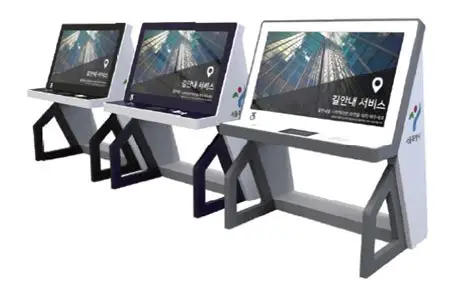
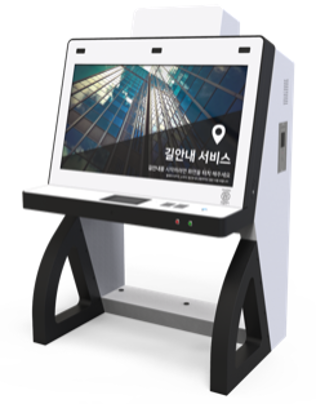
Dot establishes the global BAT standard for assistive technology that combines Digital Braille Displays, Tactile Graphics, Physical Keypads, and Real-time Voice Guidance to enable independent access to information and services for people who are:
Visually Impaired & Blind: For those who cannot see a screen, the Dot Pad (refreshable Braille/tactile display) allows them to “feel” the floor plan, exit routes, and point-of-interest locations.
Wheelchair Users & Children: The kiosk features a motorized height-adjustment sensor. It detects the user’s eye level and automatically lowers the interface so the screen and tactile pad are within reach.
Hearing Impaired: Includes AI Sign Language avatars and visual cues, providing a more intuitive experience than dense text for the Deaf community.
The Elderly & Neurodivergent: Features high-contrast modes, voice guidance, and simplified interfaces to reduce the “cognitive load” of navigating complex environments.
Key Features
The Dot Kiosk is an inclusive, all-in-one solution designed to provide equal access to information for everyone, including People of Determination. By combining cutting-edge AI with tactile technology, it removes the barriers found in traditional touch-screen interfaces.
Tactile Graphics & Braille Display
Equipped with a real-time refreshing tactile pad that renders maps, floor plans, and images into physical patterns, allowing visually impaired users to “see” visual data with their fingertips.
Automatic Height Adjustment
Built-in sensors detect the user’s height (including wheelchair users and children) and automatically adjust the screen and interface level for comfortable, ergonomic access.
AI Sign Language Recognition
Integrates an AI-powered camera that recognizes sign language and provides visual/video responses, ensuring seamless communication for the hearing impaired.
High-Contrast & Inclusive UI
Features a user interface designed for low vision and elderly users, including high-contrast modes, voice guidance, and adjustable text sizes.
Voice Guidance & Audio Navigation
Provides full text-to-speech support and a standard 3.5mm audio jack for private, guided navigation of all kiosk functions.
Universal Design Compliance
Fully compliant with international accessibility standards (ADA and Section 508), making it the ideal choice for public spaces, airports, malls, and government offices across the region.
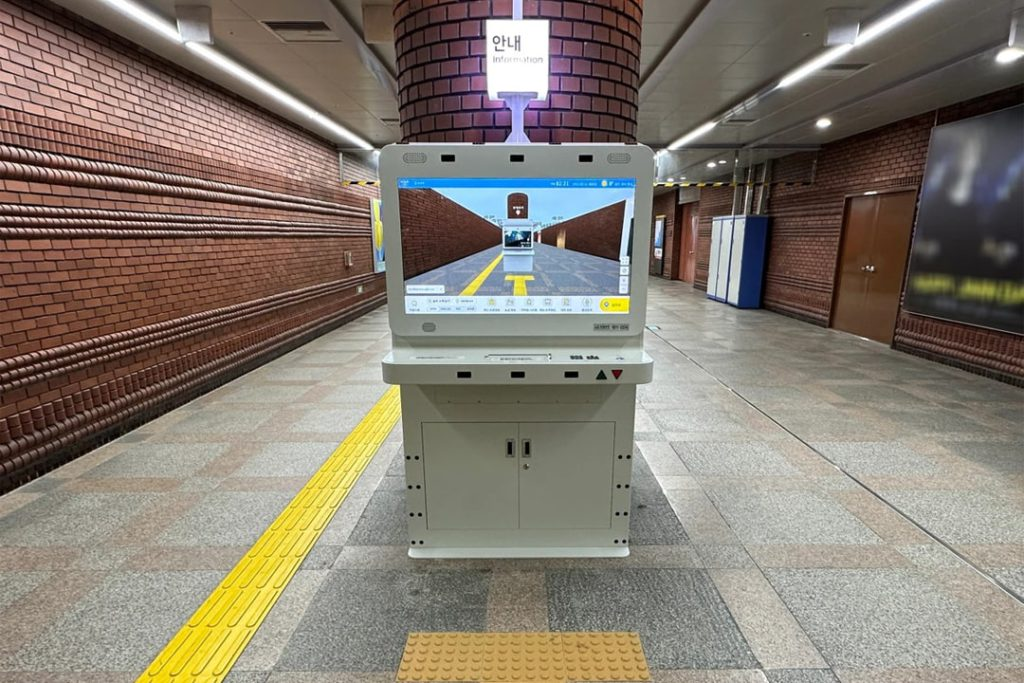
Dot Kiosk for Wayfinding
The Dot Kiosk for Wayfinding is designed to grant independence to individuals who find traditional digital kiosks difficult or impossible to use.
High-Traffic Infrastructure
For corporate and public entities, the Dot Kiosk is a strategic investment in efficiency and compliance:
- Airports & Transit Hubs: Essential for travellers with disabilities to find gates, platforms, and accessible restrooms independently, reducing the burden on customer service staff.
- Shopping Malls & Retail: Used to ensure all shoppers can find specific stores or amenities. It can also act as a marketing tool by highlighting accessible routes to “featured” retailers.
- Hospitals & Healthcare: Critical for patients who may be disoriented or have physical limitations, ensuring they reach appointments on time without needing a guided escort.
- Government & Public Buildings: Helps municipalities meet ADA (Americans with Disabilities Act) or EAA (European Accessibility Act) requirements, making public services truly open to all visitors.
Dot Kiosk for Ordering and Payment
When the Dot Kiosk is used for Ordering and Payment, it transforms from a simple information board into a fully accessible Point of Sale (POS). It is designed for businesses that need to automate transactions while ensuring they don’t exclude the millions of customers with disabilities.
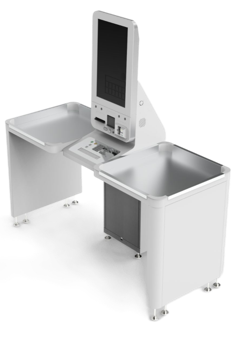
Optimized Point of Purchase
- Quick-Service Restaurants (QSR) & Food Courts: Standard kiosks often cause “social friction” for the visually impaired or those in wheelchairs, who may abandon the order. The Dot Kiosk ensures 100% self-service autonomy, allowing all customers to upsell themselves on sides and drinks via tactile and audio menus.
- Public Transit & Transportation Hubs: Ticketing is a fundamental service. The Dot Kiosk provides Universal Design compliance, allowing travellers to purchase tickets, pay for parking, or buy SIM cards without needing to locate a staffed “Assistance Desk.”
- Government & Municipal Service Centres: Privacy and Dignity. Previously, a blind or elderly person might have to dictate their credit card PIN or private data to a staff member. The Dot Kiosk’s tactile display allows for private PIN entry and secure payments without external assistance.
- Large-Scale Retailers & Supermarkets: It reduces checkout bottlenecks by expanding the pool of people who can use self-service. By capturing the “Silver Economy” (elderly shoppers) and shoppers with disabilities, retailers ensure no sale is lost due to physical barriers at the point of purchase.
- Cinemas, Theme Parks & Stadiums: These venues often have low lighting and high noise levels. The Dot Kiosk’s tactile feedback and AI-sign language interface ensure that even in a chaotic environment, every guest can quickly buy their ticket or snacks independently.
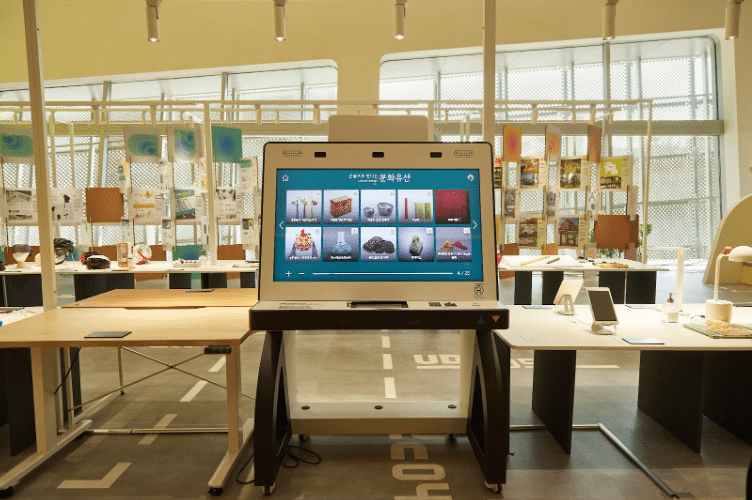
Dot Tactile Display Kiosk for Museums
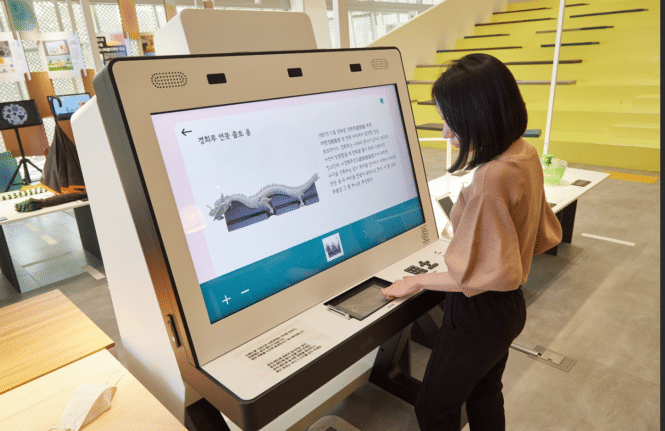
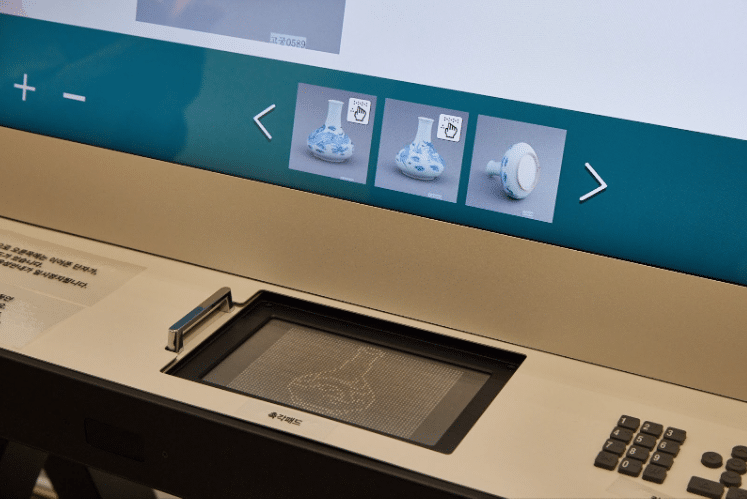
In a museum or gallery setting, the Dot Tactile Display Kiosk transforms the experience from “Look but don’t touch” to “Touch to Understand.” It bridges the gap between visual art and tactile perception, creating a truly multi-sensory environment.
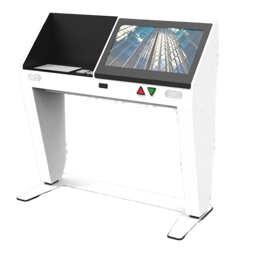
Multi-Sensory Experience
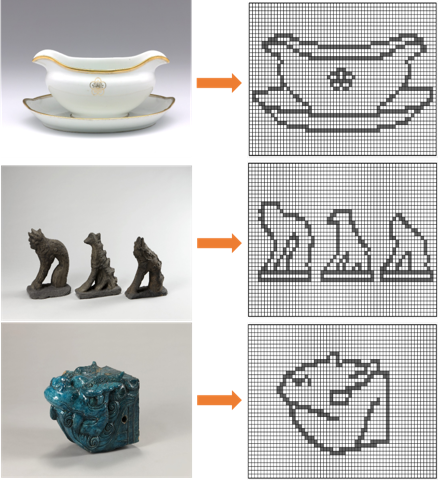
- True Information Equity: Tactile “Vision”: Translates 2D paintings and complex artifacts into refreshable 3D graphics, allowing blind and visually impaired visitors to “feel” the art. Independent Discovery: Provides Braille and audio on demand, giving visitors the dignity of exploring without a sighted guide.
- Deepened Engagement for All: Universal Learning: Enhances the experience for children and neurodivergent visitors who learn best through tactile interaction. Interactive Storytelling: Allows the public to “touch” fragile or restricted items through digital 3D renders, making history tangible.
- Operational Agility: Dynamic Displays: One kiosk can house an entire collection. Unlike static 3D
prints, you can update tactile graphics for new exhibits instantly. Space & Cost Efficiency: Saves floor space and eliminates the recurring cost of printing physical Braille signage or plastic replicas.

NaviLens has been designed specifically to enable blind and partially sighted people to be able to access and locate information and interact with the environment around them.
NaviLens codes are optical codes that contain information and can be placed on anything from buildings to packaging materials. NaviLens codes can be read by a smartphone camera from NaviLens App and do not require any power or transmit any signal. The NaviLens App is free, easy to use and works on both the Android and Apple operating systems and is completely accessible.

Benefits of NaviLens Codes:
- Help people with sight loss independently navigate and find their way around cities and spaces
- Do not require any power or transmit any signal
- The NaviLens app can recognise NaviLens codes in the vicinity. It does this without the need to focus on the code or know exactly where it is situated
- Information is presented both visually, audibly and through haptics; effectively through touch.
- Offer real-time information such as train arrivals, etc..
- Information can be delivered in 36 languages
- Revolution for indoor navigation where it’s not possible to use GPS or other computer-vision methods.
Amazing Features of NaviLens Codes

Long Distance
Scannable and Readable from a long distance of upto 50 m

Quick Reading
Reading codes with NaviLens is almost instantaneous: 0.03 seconds

Wide Reading Angle
Wide scanning and reading angle of upto 160º

Lighting Conditions
Readable in all lighting conditions

Accuracy and Orientation
Accurate distance and guidance information

No Need to Focus
No need to focus on the code or know where they are located, the codes are readable even at 80º angle
NaviLens helps make cities smarter and more inclusive. The capabilities of this code allow users to interact more easily and accessible with their environment in places such as public spaces, metro stations, bus stops, airports, museums or public buildings.
Where NaviLens Codes are Currently Used

NaviLens – Bus Stops

NaviLens – Buses

NaviLens – Airports

NaviLens – Metro Stations

NaviLens – Tactile Pavements

NaviLens – Museum

NaviLens – Museums
Moving independently and safely is essential for a better and full life for blind and visually impaired people. One important way of gaining independence is undoubtedly information. Blind or visually impaired people who have difficulty entering an unknown space need precise and immediate information that is able to represent the place where they are and the services that it may offer.
Tactile Indicators are designed to make blind or visually impaired people as independent and safe as possible in their movements, whether at work or at leisure.
To get everybody think “accessible”, not only overcoming architectural barriers but also cultural barriers to make the world around us safer, more welcoming and inclusive for everyone.
Tactile Warning Studs and Tactile Paving Tile Systems
Tactile Studs – Surface mounted warning studs made in accordance with best international practices and Dubai Universal Design Code Guidelines for blind and visually impaired people for indoor & outdoor applications.
Tactile Warning Studs provide an underfoot warning to identify hazards and dangerous areas where there is a change in levels or where there is an unprotected opening such as open stairwells and platforms.
Tactile Warning Studs are available as a Pin Type and Adhesive Type and are used depending on the Project Requirements.
High Quality Tactile Warning Studs are made of various materials like Stainless Steel, PVC, Vinyl and ABS, providing immense flexibility, durability and functionality to help blind and visually impaired people safely move about.
Surface mounted tactile paving tile systems provide a fast, easy and economical solution, providing guidance and warning for visually impaired pedestrians. Surface mounted tactile paving systems offer many advantages over traditionally used concrete materials. Not only do they provide greater longevity, the cost of installation is also lower. With no excavation required, the installation of surface bonded tactile paving tiles takes a fraction of the time it would take to lay concrete pavers. Tests have also shown that composite tactile paving tiles are significantly harder wearing, up to seven times more durable. The full range of self-adhesive tactile tiles is manufactured from a polyurethane resin and stone composite (incorporating recycled material).
Types: Polyurethane resin/stone composite. Can be fixed to asphalt: Concrete, steel, wood & tiled surfaces using a choice of dedicated adhesive. Colours available: Buff and Red. Sizes: 400mm x 400mm and 450mm x 450mm. High slip resistance in dry or wet condition. UV tested – no colour fade.


Tactile Guidance Strips and Tactile Paving Tile Systems
Guidance Tactile Indicators are designed to provide walking surfaces with a series of raised bars, which are specifically orientated to guide visually impaired walkers down the safest possible route.
Guidance tactile paving is used when blind and visually impaired visitors need to be guided around common urban obstacles such as lampposts and bins, and when guiding pedestrians to specific locations.
Tactile directional strips are available as a Pin Type and Adhesive Type and are used depending on the Project Requirements. High Quality Tactile Directional Strips are made of various materials like Stainless Steel, PVC, Vinyl and ABS, providing immense flexibility, durability and functionality to help blind and visually impaired people safely move about.
Guidance path surface tiles guide visually impaired people along a route when the traditional cues, such as a property line or kerb edge, are not available. It can also be used to guide people around obstacles, for example, street furniture in a pedestrianised area.
Tiles: Hard wearing stone & polyurethane resin composite. Wear resistance measured at 7 times greater than the equivalent concrete product.Can be fixed to: Asphalt, concrete, metal, wood & tile surfaces. Colours available: Buff, Charcoal or Grey. Types: Polyurethane stone resin composite. Sizes: 400mm x 400mm. Rapid installation – reduced labour costs & disruption. High slip resistance in dry or wet conditions. UV tested – no colour fade.


What are Video Magnifiers?
Electronic video magnifiers offer significant advantages over traditional magnifying glasses and are simple to use. By replacing a glass lens with camera and screen technology, they are able to provide variable magnification, superior image quality and a range of enhanced, high contrast, viewing modes for reading text. Improved image clarity also enables the magnifier to be viewed at a more comfortable distance, improving posture and comfort while reading and writing, making reading easier, faster and more enjoyable.
Handheld Video Magnifiers
HandyReader
- Widest magnification range available in a 3.5” screen unit.
- Enables faster and more comfortable reading than optical magnifiers.
- Powerful, pocket sized video magnifier allows access to information wherever you are: around the home, at the office, while shopping, in restaurants etc.
- Continuous zoom.
- Fast reading speed.
- Adjustable screen and LED brightness.
- User replaceable battery.

Transportable Video Magnifier
Helix HD
- Updated & improved cost effective and lightweight HD video magnifier.
- Dual 60 fps auto focus HD cameras offer high speed, blur free reading.
- Makes reading faster and more pleasurable.
- A4 page width viewing.
- Foldable and compact.
- Easy to move between multiple locations.
- Autofocus and fixed focus modes.
- Connects via HDMI to any TV or computer monitor.
- HDMI switcher.
- Tactile wireless control pad enables instant access to all main features.
- Enhanced reading colours, lines, blinds, multi-lines and signature box.
- Work In-Line or Side-by-Side: The unique wide-angle camera lenses and dual-working heights enable the camera head to easily fit under standard monitors when paired with the monitor arm accessory.

Reading Devices
Our standalone reading machines photograph any printed text and start reading it aloud within seconds, with the push of a button. They are user-friendly and suitable for people of all ages and abilities who are partially sighted or completely blind. They also allow the document to be magnified (with the optional Feature Pack) through 6 viewing modes.
ReadEasy Evolve Range
ReadEasy Evolve ECO and MAX both offer:
- Fast and accurate reading of any text.
- Tactile, user-friendly controls for all ages.
- Free software updates.
- Letters, bank statements, books, recipes, product packaging and more are all read with ease with the latest human-sounding voices.
- IntelliCapture prevents capture when a document is being moved e.g. turning the page of a book.
- Read documents in any orientation.
- Automatic analysis of the page to identify columns, pictures and tables.
- Unique automatic table detection and navigation makes tables easy to understand e.g. bank statements.
- Bluetooth headphones / speaker support.
- Automatic document cropping removes unwanted backgrounds, such as patterned surfaces; improving accuracy and speed.
- LED lighting allows capturing in poorly lit areas or complete darkness.
- 40 reading speeds.
- Supports 30+ languages with automatic detection.
- Loud, clear, stereo speakers with tactile volume slider
- Integrated carry handle & patented detachable, stowable camera.
- Headphone jack (wired headphones included) for private listening.


ReadEasy Evolve Model |
||
| Features: | ReadEasy Evolve ECO | ReadEasy Evolve MAX |
| Time to Read | 7 Seconds | 2 Seconds |
| Camera Resolution | 13 MP | 18 MP |
| Capture Area | A4 | A3 |
| Smallest font size | 5pt | 5pt |
| Voicepack Options | Vocalizer | Vocalizer or Ivona |
| Power Usage | 3.9 Watts | 17.5 Watts |
| Weight | 1.66 kg or 1.95 kg with the battery | 1.98 kg |
| Battery Option | Yes | No |
Readit Connectable Reading Machines
Designed for blind and partially sighted computer users, these portable systems connect to your PC & both magnify & read documents out loud via the Readit software. The Scholar HD is also capable of magnifying and reading distant objects.
Readit Air – Readit software and Air camera
- Continuous, multi-page A4 reading, ideal for books etc.
- Lightweight & compact, fold-down camera.
- 21 reading speeds • Bank statement mode.
- High accuracy & ability to analyse page layout to read columns.
- Documents can be saved or exported.
- Adjustable LED lighting.
- Auto language detection (30 + languages).
- 4 text highlight options.
- Intelligent motion detection increases accuracy when capturing books.
- 3D de-skewing & depth-of-field for books (up to 10cm).
- Capture documents at up to 20 pages per minute.
- Supports all multi-touch touch screens • 6 enhanced viewing modes.
- Powerful text search.
- Save time & begin reading from exact location.
- Documents can be saved or exported in: MS Word, text, PDF, MP3 & image formats; & imported from almost all MS file formats.
- Virtual X/Y mode to zoom and pan around the live document on screen.
- LED lighting allows capturing in poorly lit areas, even complete darkness.
- Soft transport pouch, headphones & contrast/positioning guide included.


Readit ZEN and Zen Max – the ZEN devices are the latest USB connectable portable camera solutions for Readit
- Paired with Readit software, ZEN delivers near instant, highly accurate OCR with the ability to read text as small as 4pt.
- Highest resolution 18MP camera for the most accurate recognition results.
- 30 fps Full HD video magnifier to magnify documents in real-time, fill in paperwork etc.
- Accurate recognition of complex document layouts and even round objects like food tins • Text-to-speech and a video magnifier system in one.
- User-friendly solution for laptop/PC users of all abilities is both compact and lightweight, weighing just 1.25 kgs.
- Place your document under the camera, press Enter on your keyboard and within seconds, the document is being read aloud, in your desired text size, colour and format.
- LED lighting allows capturing in poorly lit areas, even complete darkness.
- Instantly save and reformat documents onto your computer.
- Designed for the requirements of students, business professionals and home users including anyone on the move with a Windows laptop or PC.
- Ideal solution to be moved between locations (e.g. home, work or school).
- Fast multi-page capture: 20 pages per minute capture means you can capture and store entire text books or long documents within in minutes.
- Tactile positioning guide allows users to perfectly place & capture their documents by feel alone on either the left or right side.
- Virtual X/Y mode to pan around the live document using your mouse or touch-screen.
- Multi-touch support for touch-screens allows pinch-to-zoom and tap to start reading.
- Uses a single USB 3.0 port – no need to keep the battery of a separate device charged.
- Footprint: Occupies just 85mm x 75mm of table area.
- Versatility: Captures text from almost any surface, flat or round. Readit ZEN’s camera allows capture deep into the spines of books without flattening them, as well as read 3D objects like tins.


Readit Scholar HD – All the features of the Readit Air, with the addition of:
- Lightweight, portable and compact camera system that plugs into any PC or laptop via one USB 2.0 connection.
- Instantly capture any document (closeup or distant) and it will convert it into large print and read it aloud; letters, bank statements, text-books, novels, product packaging etc. all become fully accessible for blind and low vision users.
- 16 MP camera for accurate full page (A3) text-to-speech.
- Unique 21x optical zoom with optical and digital stabilisation making high zoom levels usable.
- Continuous, multi-page A3 and A4 reading.
- Unique distance read-out-loud feature to access whiteboards & projectors.
- Camera can be twisted upwards and angled to view a presentation or teacher, or pointed directly at the user for personal grooming.
- Ideal product for students and business professionals.
- Featuring 720P live image quality (1280 x 720 pixels at 60 fps), the Scholar HD provides a significantly sharper and clearer image in live mode, particularly at magnifications below 5x: Enabling handwriting to be enlarged as it’s written, or notes to be quickly magnified.
- Extremely fast set up and packing away: Readit Scholar HD takes less than 8 seconds to set up from folded and connecting its USB cable!

Readit Camera Model |
||||
| Features: | Air | Zen | Zen Max | Scholar HD |
| Camera Resolution | 5 MP | 18 MP | 18 MP | 21 MP |
| Zoom Type | Digital | Digital | Digital | Optical 21x |
| Capture Area | A4 and A3 | A4 | A3 | A3 |
| Smallest Font Size | 6pt | 4pt | 5pt | 6pt |
| Live Video Magnifier | No | Full HD 30 fps | Full HD 30 fps | Full HD 60 fps |
| Distance / Self View | No | No | No | Yes |
| Battery | No | No | No | 8 Hours |
| USB Connection | 1 x USB 2.0 | 1 x USB 3.0 | 1 x USB 3.0 | 1 x USB 2.0 |
| Footprint | 62 x 52 mm | 85 x 75 mm | 85 x 75 mm | 180 x 270 mm |
| Weight | 0.5 kg | 1.25 kg | 1.25 kg | 1.3 kg |
CoaSt
An education / business focussed distance camera solution with both Windows and iPad support (Mac and Android support to follow).
Weighing in at just 350g, this lightweight device boasts a 4 MP camera with an impressive 10x optical zoom. It comes with an adjustable height stand. It gives business professionals and students unparalleled access to all the content they require.
Unique Features of CoaSt with Readit Software
- OCR and TTS: Instant OCR and text-to-speech with the latest human sounding voices (at both closeup and distance).
- 6 powerful text views: Original Image (colour enhanced), Overlay, Column, Horizontal, Vertical and Word views make visually reading text in documents far more comfortable, faster and enjoyable.
- Smooth: Up to 360 frames per second when panning and auto-scrolling documents means text is very sharp and clear even at very high speeds.
- Multi-page capture: High speed multi-page capture with background recognition recognises pages as quickly as they’re captured..
- Navigation and Text Search: Navigate using the familiar navigation shortcut keys and jump straight to text faster than a sighted user with a book thanks with the powerful Find function.
- Multi-language: Supports over 30 languages (included) with automatic language detection and automatic voice switching based on the language.
- Document Import: Load PDFs, Word documents, image files etc. directly into Readit for them to be recognised and reformatted in any one of the 6 text views.
- Document export: Export any document from Readit to an accessible PDF (with text font and colour enhanced), Word file, txt, rtf, MP3 (to listen to) etc.
- Print to Readit: Any software with a File -> Print function can have its document printed directly into Readit within seconds
- Screenshot OCR: Instantly capture anything on screen and have it read aloud and shown in our chosen text view
- Copy and Paste: Copy and paste documents into Readit, or copy text within Readit to paste into your text editor using standard shortcut keys.


The Clevy Keyboards are designed specifically for children and individuals with special needs.
Here are some key features:
- Durable and Fun: The keyboard is strong and colorful, making it appealing and less intimidating for kids. The keys are 30% larger, and the characters are up to 4 times bigger than those on a standard keyboard.
- Spill-Resistant Design: It has a housing designed to guide spilled liquids away from the internal electronics, enhancing its durability.
- Educational Use: The keyboard features easily recognizable lowercase letters, complementing primary school writing lessons, and is built to withstand rough use.
- Assistive Features: It includes options for individuals with dyslexia and low vision, making it a versatile tool for various users.
A Strong Mechanical Keyboard that Assists.

- Key & Character Size: The keys on this keyboard are 30% bigger and the characters on them are even up to 4 times as big as those on an average keyboard.
- Recognizable Fonts: The Clevy Keyboard’s fonts on each of our colored layouts are similar to the fonts used in their respective educational systems.
- Clear layout: The keys of the Clevy Keyboard are arranged vertically to improve the positioning of the hands of a kid and to make the appearance less cluttered. Unnecessary and distracting keys are left out.
- Solid construction: The Clevy Keyboards have internal steel frames and each individual key is mounted onto a high-quality, mechanical switch capable of handling well over 60 million keystrokes. Most keyboards on the market use membrane-type internal switches, which are far less durable and consistent.
- Spill-proof: The Clevy Keyboards housing is designed to guide possible spilled fluids straight through the keyboard, keeping these liquids away from the internal electronics.
The High-Contrast Keyboard for Low Vision.

- Key & character size: The keys on this keyboard are 30% bigger and the characters on them are even up to 4 times as big as those on an average keyboard.
- Extra clear font: For the Clevy Contrast Keyboard we did a lot of research on the font. The research found that Arial Black is most visible for the visually impaired.
- Clear layout: The keys of the Clevy Contrast Keyboard are arranged vertically to make the appearance of this keyboard less cluttered. Unnecessary and distracting keys are left out.
- Spill-proof keyboard: The Clevy Keyboard’s housing is designed to guide possible spilled fluids straight through the keyboard, keeping these liquids away from the internal electronics.
- Add-on keyguard: The Clevy Contrast keyboard can be expanded with an add-on: the Clevy Keyguard, which enables users with motor skill difficulties or motor impairment to let their hands rest on the keyboard without accidentally pressing any keys and guides the user’s fingers toward the right keys.
Low Vision Contrasting Keyboard.

- Optimal Ease of Use: The extra large and clear font makes the letters very visible, and the icons and abbreviations used and abbreviations relevant functions immediately identifiable. The Clearkeys features the so-called “longtravel chocolate keycaps”, the individual keys are clearly distinguishable from each other because there is space between them but also provides excellent tactile feedback. tactile feedback. These keys are also concave in shape, to provide a natural focal point, and the pathfinders on the F and J keys.
- Modern Design: The elegant and sleek design of the Clearkeys is not only functional, but also gives it a design that matches today’s aesthetic standards. Both the keys and the board itself are matted, so that reflection by ambient lighting is prevented. In addition, the red indication LEDs have been made extra bright for optimal visibility. Furthermore, the keyboard rests low on the surface, which improves the ergonomics.